Storing and Loading Simulations
The most efficient way to store simulation results is probably to output the relevant results array, e.g. the sim.population_array or the output of sim.get_mutant_clone_size_distribution().
The simulations can also be stored as pickle objects.
This means they can be reloaded later, giving access to all results and functions.
This can also be useful for very large/long running simulations. The simulation results can be periodically saved, meaning that they can be restarted from these checkpoints if needed.
Running a simulation and dumping as a pickle
import numpy as np
import matplotlib.pyplot as plt
from clone_competition_simulation import Parameters, TimeParameters, PopulationParameters

np.random.seed(0)
p = Parameters(
    algorithm='Moran',
    times=TimeParameters(max_time=10, division_rate=1),
    population=PopulationParameters(initial_size_array=np.ones(100))
)
s = p.get_simulator()
s.run_sim()

# Dump the simulation as a pickle
s.pickle_dump('sim.pickle.gz')
Using the s.pickle_dump method instead of simply using pickle.dump makes sure that the random state is stored
and colourscale functions are included.
Load the simulation from the pickle
from clone_competition_simulation import pickle_load
s2 = pickle_load('sim.pickle.gz')
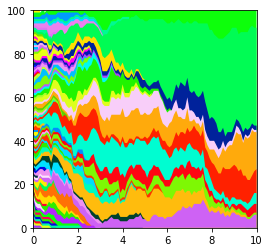
s2.muller_plot(figsize=(4, 4))
plt.show()
Saving checkpoints
For very long running simulations that may be interrupted, it can be helpful to store the results at a checkpoint.
The simulations can then be continued from that point.
This functionality was added when the simulations were much slower to run, but has been left in case it is still helpful.
This will store a new file for every sample point. So best used if there is a long simulation time between sample points or the storage will add a substantial chunk to the simulation time.
Two tmp files are used - the storage alternates between the two files.
This ensures that if the simulation stops due to issues with the pickle dump, there is still a backup from the
previous checkpoint.
Will set up a long(ish) simulation but stop it before it finishes. Using a custom rule that will stop the simulation at a certain step.
from clone_competition_simulation import pickle_load, Moran

class CustomBreakingSim(Moran):

    def __init__(self, parameters, last_step):
        super().__init__(parameters)
        self.last_step = last_step

    def get_dividing_cell(self, current_data):
        if self.i == self.last_step:  # Stop at this step
            raise TimeoutError("Stop simulation")
        return super().get_dividing_cell(current_data)

p = Parameters(
    algorithm='Moran',
    times=TimeParameters(
        max_time=100,
        division_rate=1,
        samples=5,
    ),
    population=PopulationParameters(initial_size_array=np.ones(5000)),
    tmp_store='tmp_store.pickle.gz'  # Set the file path to the storage at checkpoints
)

np.random.seed(0)

# Interrupt the simulation after 250,000 steps
s = CustomBreakingSim(p, 250000)
s.run_sim()
Running simulation... ━━━━━━━━━━━━━━━━━━━━╺━━━━━━━━━━━━━━━━━━━  50% 0:00:04
TimeoutError: Stop simulation
This has placed files called tmp_store.pickle.gz and tmp_store.pickle.gz1 in the current directory
s_continued = pickle_load('tmp_store.pickle.gz')
s_continued1 = pickle_load('tmp_store.pickle.gz1')

# We can check the number of simulation steps the two stored simulations have reached.
# (could also check the last modified time of the files instead)
print(f'First pickle step: {s_continued.i}')
print(f'Second pickle step: {s_continued1.i}')
First pickle step: 100000
Second pickle step: 200000
The second pickle is the most recent backup of the simulation.
We can continue where that simulation left off:
# First change last_step so it can complete the simulation
s_continued1.last_step = -1
s_continued1.continue_sim()
09:50:10 | INFO | Continuing from step 200000
Running simulation... ━━━━━━━━━━━━━━━━━━━━━━━━━━━━━━━━━━━━━━━━ 100% 0:00:00